Review
As promised on Instagram, I’ve been putting two fitness trackers to the test. The Fitbit Charge and the Garmin Vivofit.

Before I get down to business, I thought I’d review the Fitbit Charge on it’s own first. {You can read my review of the Vivofit here.}
Just for the record, I received this Fitbit from VerizonWireless & Fitfluential. Without further ramblings, here are the details:
Fitbit Charge Review
*The Charge is one of many Fitbits available. This one displays information directly on the band as well as through an app, and does not have interchangable wrists bands. This is the one I have –>> Fitbit Charge, small, slate $125.
Pros
Displays information directly on the wrist band. Pushing a button reveals time, steps taken, calories burned, miles covered, and flights of stairs climbed,
Numbers are lit {aka you can see them in the dark}
Syncs to app wirelessly through Bluetooth quickly
Tracks sleep according to number of wake ups and number of restless minutes. I find this method of reporting information more useful than other versions. {Although one time I sat reading a book so long it thought I was asleep. Oops.}

Tracks “active minutes”. Let’s you get an idea how much was “exercise” vs daily movement {to some extent}.
App is user-friendly, attractive, and full of information. I really, really like the Fitbit app. You can see trends, averages, integrate with MyFitnessPal, etc. It also has different challenges you can do to help with motivation & interact with friends.

Cons
Wide wristband. It doesn’t appear super bulky {although it’s wide} but I do notice it a lot. The part of the wristband that isn’t flexible {the technology part} takes up a good amount of the band, making it not move or sit super well on my smaller wrist.
Comes sized, with one band. Some trackers come with multiple wristbands in the same box, including the Flex. This one doesn’t – you have to pick a size upfront. This may not matter to most, but it means I can’t share with my husband.
Limited color selection. Similar to above, you get what you get. You can’t swap out sizes or colors. I’m not a fan of the odd blue color {aka “slate”} I have, and there isn’t a big selection of other colors anyway. Maybe this will change down the road? {Anybody know??}
Have to push button on side of wristband to view display. I’d rather just see the number staring back at my face, or at least be able to choose which reading shows up first instead of clicking through.
Battery needs charging. This goes somewhere between pro and con, really. The Charge needs to be plugged in to charge the battery, meaning you have to take it off to do so {and not count steps}. However, it charges quickly and the battery lasts awhile – at least a week/week and a half. If you charge it while you’re sitting anyways, you don’t miss much.

Do you where a fitness tracker? Which kind? Have you tried the Fitbit Charge? {If you have a Fitbit find me at heather @ sideofsneakers . com!}
Tweet: Check out this @Fitbit review from @sideofsneakers #connectedlife http://ctt.ec/PY7pN+
Products
I never put much thought into wearing a fitness tracker. I had a basic FitBit briefly but it didn’t engage me enough to keep wearing it and I hated the color so I rarely actually put it on. I figured I was active enough and counting steps wasn’t really on priority list. Then I got the Garmin Vivofit {which I received through my partnership with Verizon Wireless & FitFluential – I don’t have to blog about it but I want to because it’s cool}.
I strapped it on and prepared to watch the steps start counting up, up, and up…

Only they didn’t. I’d have mornings and moments filled with lots of fun, activity, and steps, then I would barely cross over to my goal by the end of the day. Other days the number of steps I ended with was just abyssmal. It was a bit of a wakeup call – I know how bad sitting and not being active is, yet here I was pretty much being a lazy bum in denial. While I’m not perfect about it, sitting the actual number of steps I’ve taken at any given moment is definite motivation to get up and moving.
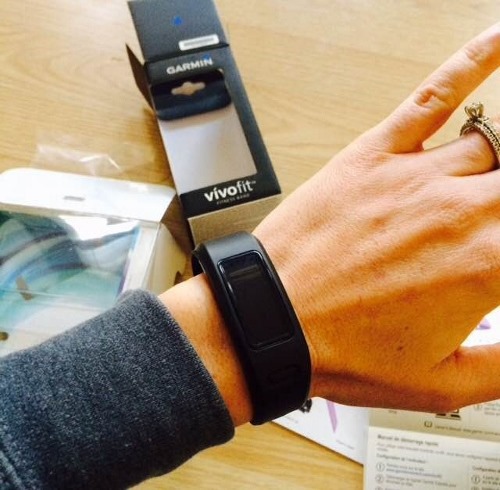
So about the Garmin Vivofit specifcally: here’s my basic list of Pros & Cons to make it easy for you to skim through. {Here’s the vivofit I have.}
Pros
No need to charge battery – it’s a watch battery that’s predicted to last about a year. This means you never have to take the tracker off, stop tracking activity to charge it, or remember to put it back on, and no charger to keep track of. This is a huge plus in my book.
Shows when you’ve been sitting too long – A red bar bar appears above your step count if you’ve been still for too long. For each 15 minutes you remain still, a shorter bar is added. Walking around for a minute doesn’t make it automatically disappear either – it takes a bit of movement. {I desperately want to make this a con because it drives me crazy, but it’s the entire point of wearing one – to move more.} I believe the Vivofit 2 beeps to alert you when the red bar appears.

Multiple displays – with the push of a button you can choose to show # of steps taken, # of steps left to reach your goal, miles traveled, calories burned, time, or date.
Color selection – I have basic black but I love the bright blue and purple. {There’s also others.}
Easy set up – you literally put it on and it works.{It comes with two sizes of wrist straps that you can interchange.} Besides that you can just download the Garmin Connect app and sync it wirelessly through Bluetooth, or it comes with a piece to plug into your computer to do the same.
Can automatically set & adjust your goal based on behavior. – I might not have known where to start otherwise.
Can get wet – can leave it on in the shower and swimming.
Can’t “force” it to take steps – I can’t shake my arm off like T swizzle and make it think I took a bunch of steps.
Cons
A little bulky – It’s a little bit on the big side for my preference, but I’m not sure there’s a smaller one out there that also has a display. {?} I find wearing it with the display side on my inner wrist {technically upside down} is more comfortable, especially when sleeping. This means I have to choose to look at it, meaning I might not notice that evil red bar telling me I’m being lazy.

Poor sleep tracking – the sleep tracker only records how much you move while sleeping, and if you set your normal wake/sleep times it defaults to them no matter when you push the sleep button. While the amount of movement tends to correlate with my quality of sleep {i.e. lots of movement when the toddler takes over my bed}, it’s not always a perfect indicator and it doesn’t give me any information on how to improve this.
App leaves much to be desired – after the first few days of looking at things, I pretty much ignore the app. It’s nice to go back and look at the bigger picture, but besides that it doesn’t do much for me personally.
No backlight – not really a big deal but it’d be nice to be able to see the numbers when I’m going to bed or setting it to the sleep option {when I’m in bed and it’s dark} instead of just guessing.
Doesn’t always seem to predict movement/non-movement right – maybe it’s just smarter than me, but sometimes when I’ve been crazy active it still gets a red bar and when I’ve been lying around it doesn’t. Hmm.
So that’s it all broken down, but I haven’t taken it off since the minute I put it on, if that tells you anything. 

Get it here –>> Garmin Vivofit Fitness Band, $89 **Currently 10% off at Verizon!**
Do you wear a fitness tracker? What kind and do you like it?
Tech
this post is sponsored by FitFluential on behalf of verizon wireless
I spent this past weekend on a quick girls getaway slash reunion with some of my friends from college.

Though the appeal of bringing my real camera was there {gorgeous scenery and historic architecture}, the last thing I wanted to be doing was lugging around a heavy bag with fragile contents as we jumped from beach to bar to tours to eats. Instead I took the Nokia Lumia Iconfor a spin. Plus that way I could instantly share my fun and photos using the Verizon Wireless network instead of waiting to get home. I was a customer of Verizon’s before I started working with them and I continue to love their fast service and broad coverage.

If you haven’t used a Windows phone, they’re kind of fun. At first it seems different than what you might be used to, but it’s super intuitive and easy to navigate. It has all the apps I’m used to using on a daily basis, plus an awesome stock camera. I love that the “live tile” format lets me see what’s happening on any given app without having to open or load anything, but my favorite part is how well it meshes up with my computer since I’m a PC girl. Seriously, Microsoft office and SkyDrive on my phone so I don’t have to email article notes to myself? Yes please.

Pros
5” HD display
1080p with zoom video
Captures audio wherever it’s pointed
Adjust shutter speed, ISO, etc.
Power button placement
Fresh paint
make radio playlists to play offline
Cons
Delayed shutter speed if not using external camera button.
A little big for one-handed typing.
I’m still getting used to it and learning all the little tricks, but so far I’m liking it!
Have you used a Widows phone before?
this post is sponsored by FitFluential on behalf of verizon wireless
Products
The following post is sponsored by FitFluential LLC on behalf of Verizon Wireless.
There are a lot of things we’d all love more of, aren’t there?
– More time
– More money
– More sunshine
– More SPRING
– More muscle
– More endurance
– More strength
– More time …oh I said that, huh?
Guess you can’t really buy those thing at a store or pluck them off a wish-granting tree. That’s too bad. But there are ways to make some of those happen.
The only way I’ve figured out how to get more time is to do the dreaded, unrecommended time-management strategy of multi-tasking. Dun dun dunnn. I try to do it with things that won’t suffer from lack of total attention. Example: listen to a report on my phone while on the treadmill at the gym. I know, way less exciting than some good mood-boosting music. {I use the Sol Republic relay headphones I’ve mentioned before. Love that they actually stay in my ears.}
Or perhaps checking and replying to emails that only need a quick, non-indepth response if I’m a few minutes early picking the Kynado up from preschool. {I don’t waste a minute of precious school time.  }
Or timing a conference call for when I’d be stuck in the car anyways. {Thank goodness for the invention of blue tooth.}
The downside is these things all require the use of your phone, minutes, and data plan. A plus since it’s an on the go option but still a negative because it’s easy to go over all that stuff especially if you share a plan. I’ve told you about Verizon Wireless’ EDGE program before; their newest program focuses on the plan instead of just the product. It’s called… MORE {surprise, surprise}. MORE Everything gives you a way to have more text, talk, and data, without spending more money.

It includes {among other things}:
– Shareable data
– Unlimited texting
– 25 gb cloud storage per user

So until there’s an actual way to really get more time, using technology is the best way I’ve found to get around it.
What to you do to squeeze in more?
Just a reminder, this post is sponsored by FitFluential LLC on behalf of Verizon Wireless. If you couldn’t tell.
Tech
The following post is sponsored by FitFluential LLC on behalf of Verizon Wireless.
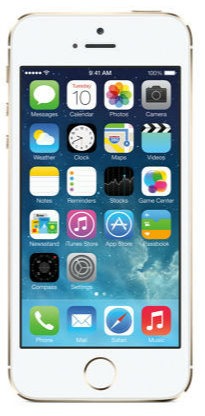
I was way late to the smartphone wagon, which is especially odd considered my work is on the internet. Once I got my hands on one I never looked back of course. While we’ve always been an Android family, we’ve always been curious whether we should have gone iPhone or not. Now I’ve had the chance to find out: I’ve been using the new iPhone5s with iOS 7 from Verizon Wireless for the past few weeks for a Fitfluential campaign.

So here’s the skinny on the iPhone5:
Likes
- Swipe to open camera from lock screen.
- Fingerprint unlock and app purchase.
- App availability.
- Fast shutter speed on built-in 8mp camera.
- Physical switch to turn sound off/on quickly.
- Control center: swipe from bottom on any screen to access control settings.
- Size: lightweight, skinny, easy to use with one hand.
- Drag and drop to make app folders.
- Crystal clear {retina display}
- Lots of sound options for ringtones and alerts, etc.
- iMessage for texting other iPhone users
- Custom shortcuts {Ex. I can type “sos” and sideofsneakers will auto-populate.}
- Loads quickly on VZW 4G LTE network.
- *Facetime: I would love this if the husband had an iPhone so we could each see the little guy when we’re away from each other.
Dislikes
- Need to enter password for app purchases.
- Not many setting options on built in camera.
- Few options for sharing webpages.
- Size: hard to read text without enlarging and lots of scrolling.
- Limited appearance options.
- Can’t see notifications without touching phone.
- Don’t like double-clicking home button to “go back” a screen or clicking website at top to make back browsor button appear on bottom of screen.
I think my biggest “likes” would be the size, shortcuts, and easy open camera since that’s what I use my phone the most for these days. My biggest “dislike” is the limited sharing ability without opening different apps or copy+pasting.

In complete irony, now that I have an iPhone something cool came out for Android first. I guess I need to continue exercising my patience for apps. This one is the ISIS mobile wallet app from Verizon. You can enter in your credit card and loyalty card information and use your phone to pay for anything that accepts ISIS payments.You can also use an American Express prepaid Serve account {which is free and you can use your credit card to load it} and earn up to $200 back on purchases {20%}. It’s completely secure so no worries about losing your info – it uses a different CCV for each purchase, you need to enter a pin to use, and you can deactivate remotely for extra backup if you lose your phone.

I will be downloading it the second it comes to iPhone since I have a tendency to run out of the house with nothing but my phone and car keys. At least I know I can always get Starbucks if I forget my wallet. 
If you want to try out a new Verizon device or learn more about ISIS, there’s a Twitter chat November 18, 2013 at 9:00 PM EST on the hashtag #VZWFF. They’ll be giving away a Samsung Note 3 and a Samsung Galaxy S4. {sweet!}
So, are you Android or iPhone?