Apps
I’ve been loving wearing my fitness trackers {I have the Garmin Vivofit & the Fitbit Charge}. I’ve had one of them on since the day I got the first one. Honestly sometimes they really piss me off because I thought I was a lot more active than apparently I really am, but that’s exactly why I also continue to wear one – it’s great encouragement and a constant reminder to get up and move just a little bit more. It’s made me realize how important just a daily walk around the block is when I don’t have time for anything else. Those steps add up!

While I love scrolling through the numbers on my wrist and analyzing the data in my app, sometimes all that information still seems to be a bit lacking. Ok, so I know my average number of steps and can see how my sleep is from day to day, but what does all that really mean? Move more? Sleep more? All of the above?
That’s where the app AddApp comes in – it analyzes your habits for you. It meshes information together and spits out an understandable, tangible insight. Not only does it take data from certain fitness trackers, but also works with other apps like Apple Health, MapMyRun, Runkeeper, Strava and more.

Once you’ve added the services you want to sync, the app eats up all the data and spits it out in nice little succinct “insights”, such as the number of steps you average, how many hours of sleep you tend to get, and how many calories you’re burning from activities. It will also analyze the data a bit more and send you little notes and tidbits, like you haven’t logged any steps for awhile, you haven’t been recording nutrition information, or that you had a particularly low number of hours of sleep one night.
Having the data rolled up into succinct little bites of information is super helpful {alhtough I certainly didn’t need my phone to tell me I didn’t get enough sleep on a particular night – I knew that without any technology clueing me in!}. It’s yet another reminder to get up, get moving, and take care of yourself.

Download AddApp and start getting your insights so you can make sense of all the data you have at your disposal.
This post is sponsored by FitFluential on behalf of AddApp.
Apps
Sad, right? That I can even make a statement like that. That I wouldn’t shop without apps. Who thought this behind-the-technology-curve girl who hasn’t even owned a smartphone for a year would say that?

But once you have the convenience in your hand, it’s hard to ignore. Our lives only seem to get busier and more hectic, and somehow having so many resources in the palm of my hand seems to help my sleep-deprived, scattered brain keep it together, if only just a little bit.
{This is a follow-up post to my Freshpedition post, in which 2 guys venture across the country showing how technology can bring fresh food to surprising places.}

1. Catch
{iPhone; Android; free}

Catch is an on-the-go bookmarking app. You can use it from your phone or computer, meaning everything is all synced up no matter where you are. I use this for a lot of things, but most often for recipes or meal ideas. As I’m reading blogs, news, or searching for recipes online, I “Catch” things I want to remember. Then I can easily open the app when I’m making my grocery list or while I’m at the grocery store to see what exactly it was I was thinking about making and what I need to make it.
I’m pretty sure it’s like Evernote, but I could just never get on board with that one, I’m not sure why.
2. Cozi

{iPhone; Android; free}
Cozi is best known as a shared family calendar. That’s a great feature, but I use it instead for it’s list-making abilities. From to-do lists to shopping lists, it’s nice to have it all in one place. As we run out of things or I think of something I want to eat, I add it to the shopping list. When I’m at the grocery store I never have to worry about forgetting to copy down the grocery list from the board in the kitchen or trying to remember what we have or don’t have. You can also store recipes in a recipe box and drag and drop meal ideas into a calendar for the week so you never have to wonder what’s for dinner.

3. Dirty Dozen

{iPhone; Android; free}
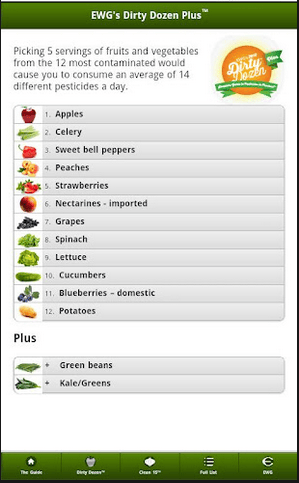
I’ve never been much of an organic food buyer. I know, I know. But now that I’m feeding a precious life with a brain new digestive system, I’ve been paying more and more attention to organic foods and pesticides. Even though all organic would be the best scenario, there’s no getting around the fact that organic foods cost more and there’s just not room in the budget for that. Enter the “Dirty Dozen” and “Clean 15”: the 12 most pesticide-contaminated produce items and the 15 least contaminated items. Even though there’s only 12 on the dirty list, I can rarely remember more than one or two. Pulling up this app makes it easy for me to make a decision while wondering among the fruits and veggies at the store.

What apps do you use to make your grocery shopping/meal planning experience easier? How does technology play a role in healthy living or eating for you?
Guess who’s ready to climb out of his crib? This guy.
With ultra-filtered water from the first ever hands-free dispenser, and micro-climate controls powered by TwinChill technology, the new GE French Door Refrigerator is engineered to push the limits of fresh.
Disclosure: Compensation was provided by GE via Glam Media. The opinions expressed herein are those of the author and are not indicative of the opinions or positions of GE.